
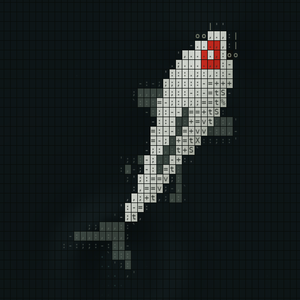
ASCII Japanese Garden Wallpaper places animated koi made from characters behind Windows desktop icons. The official description combines a small choice of fish varieties with swimming motion, light or dark ponds and saved preferences. This first look uses Microsoft's official product information, not a performance or visual-comfort test.
The audience is someone who wants the desktop itself to feel more alive. This is an aesthetic application, not a productivity system or a static wallpaper collection. The runtime boundary is explicit: the animation exists while the app is running, and the app does not export still wallpaper files. That distinction matters if you are buying an image to keep rather than a small ongoing desktop experience.
Based on official store information. We have not tested this app hands-on.
What it does
Eleven named koi varieties are included, with a total of one to nine fish in the pond. Counts can be set by variety. Newly added fish receive individual sizes, body shapes and swimming rhythms, with bending bodies and tails that alternate movement and gliding. Those are the developer's animation descriptions, not our findings about biological realism.
A white or black background and a matching glass-style settings window provide the two stated visual settings. Swimming speed and the frame-rate limit can be adjusted independently, and animation can be paused. Those are different controls: a slower fish is not necessarily the same experience as a lower display-update rate.
The app can start when signing into Windows without opening settings. Language choices include English, Japanese or the system language, with the selection saved. Each launch starts with three koi, while background, speed, frame limit and other preferences persist. Newly generated fish appear after a restart because size and shape are assigned when a fish is added. A precise recurring arrangement should not be assumed from saved settings alone.
Before you install
The most important interaction detail is easy to overlook: closing settings with the top-right X exits the whole app, including the wallpaper. Minimise settings to keep it running. A familiar window control has a particular consequence here, so inspect that behaviour before assuming the animation crashed or disappeared unexpectedly.
Check the pond against the desktop you actually use. Icons, filenames and open windows should remain readable, and constant motion may be welcome in one setting but distracting in another. We have not tested contrast, multi-monitor behaviour, resource use or accessibility. The description does not establish automatic pausing for every full-screen application or power-saving state.
The independent speed and frame controls provide a practical evaluation route. Start restrained, compare ordinary desktop use and decide whether the motion remains pleasant after novelty passes. A character-art style can be charming without a claim that it reduces stress or improves focus. We do not turn a decorative preference into a health or productivity result.
Price and access
The retained US Microsoft Store offer displays $2.59. The developer describes a one-time purchase including all eleven current varieties, with no subscription. Confirm the current regional price and Windows requirements before buying. Windows 11 x64 is required according to the description; Wallpaper Engine is not required.
The purchase is for the running wallpaper application, not exported static images or an unlimited promise of future varieties. The word current in the feature scope matters. Evaluate the included pond and controls as documented rather than assuming an ongoing content programme or another wallpaper platform is bundled.
Our take
ASCII Japanese Garden Wallpaper's strongest proposition is a small, specific visual object: koi animated through character art, with enough controls to choose the tone and amount of motion. The included varieties and per-fish variation give it more definition than a generic animated-background claim. Whether that object is enjoyable remains a personal judgement we have not tested.
We have not evaluated performance, stability, accessibility or long-session comfort. Our take is to inspect the official presentation and the explicit runtime rules before buying. Choose it if the character-art pond appeals on its own terms and fits your Windows setup. Do not buy it expecting a static export, a permanently saved fish arrangement or an effect that continues after the app exits.
The restart behaviour is part of the design rather than a detail to hide. A fresh set of generated koi may be enjoyable, while someone wanting an exact composition may value it differently. The same applies to the initial three-fish state: saved preferences do not mean every element resumes precisely as it was.
For a working desktop, the successful result is often modest. The pond should be enjoyable when visible and unobtrusive when your attention belongs elsewhere. Pause, speed and frame settings can support that decision, but the listing does not establish every automatic context rule.
A low one-time price is a clear commercial proposition, not a measure of visual quality. The appropriate first-look judgement is interest in a well-defined decorative idea with practical limits honestly stated. The final choice should rest on the actual look and runtime behaviour you want, rather than a larger problem the app never claimed to solve.
Sources
App icon from the official store listing.


